
Here’s is a possible idea for the backend - the objects would be crammed into a relational database for now (unless or until there are good open source oodb’s available). A simple synchronize command would generate a file for each object (stored in YAML code or something similar). Desktop Search plugins would be indexed off of these files, and they could also be edited in Notepad and then resynched with the database.
Putting them in files would also allow storing their history in a repository like Subversion (not sure how easily extractible that history would be though, eg for field values). This would also allow use of standard merging tools for keeping the data in synch with other copies. For instance, if you have a giant database on your home machine, and then upload a chunk of it to a website (say all the objects marked as public) - then they could both be edited at the same time and kept in synch.
Eventually, I’d like to wrap all my existing files with metadata (eg by putting each file in a .zip archive along with a metadata text file (using yaml), and give it some standard extension, like .neoobj or something). These files would then sit in the folder along with all the other yaml object files, and the database would be kept in synch with their metadata also (leaving the actual binary file data on the file system). The net effect is that you would have a virtual file system sitting on top of the existing one, that is platform independent, open source, and provides metadata and history for all your files.
The Windows Explorer plugin would just be something that would expose the folder containing all these objects, and let you save files there (which would then wrap them in a metadata wrapper automatically, etc), or load them, etc. I’m not sure how this would work out yet, but it would be a way of letting legacy apps save files to your data store, instead of the old file system.
Note that if you wanted a portable version to take along with you, all you’d need is the SQLite database and a small frontend (eg the old NeoMem frontend, since it’s in C++ and makes for a small .exe). It could also be adapted for a PDA someday (which I would really like to have, to take the place of all these index cards I’m always carrying around with me). More on that later…
Here’s a rough picture of the architecture:
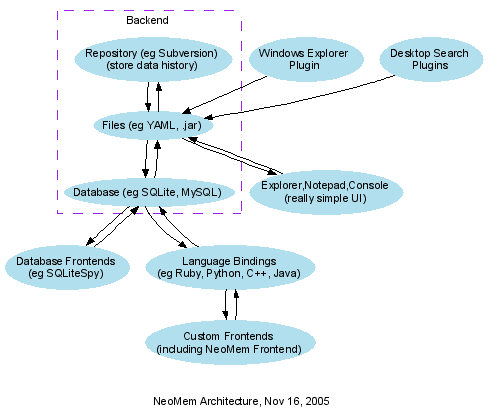
Developed with Graphviz (source for the drawing here).
Tags: No Tags
4 comments
Comments feed for this article
November 17th, 2005 at 11:04 am
A de Koninck
I am not a programmer but as an experienced user, think your solution is too Windows-centric. IMHO what killed KeyNote is that it was RTF-centred (in particular, no tables). In other words, you are limiting yourself to Windows too much and could suffer the fate of KeyNote. I would personally prefer a more wiki-oriented solution with an SQL database containing the data. You could sugar-coat it with a WYSIWYG front-end and have a Windows Explorer-like tree view to get at the data.
For me, tables are a necessity. For the moment, I am using Sport Scribe, a light-weight freeware word processor to generate tables and dropping them into KeyNote.
November 18th, 2005 at 12:49 am
bburns
Maybe the description is misleading in that it mentions Windows, but it’s actually independent of which operating system you put it on - it would work sitting on top of Mac, Linux, or Windows. Each OS might need some way of interacting with the data though, if it eventually became your main data store. So yes, NeoMem is definitely going cross-platform.
I’d like to incorporate some wiki features as well - eg the wiki markup is human readable, unlike rtf (what NeoMem currently uses). And maybe some future wiki editor component will allow for table editing as well…
November 20th, 2005 at 11:01 am
A de Koninck
Further to my previous comment, thanks for the clarification. As I siad previously RTF is a deadend. You are depending on the good will of Microsoft.
At the present time, I am using WxWikiserver as a wiki and watching tiddlywiki (just as I am using Keynote and Freemind [for mindmapping] and watching Neomem and jreepad.) Wikis are quite helpful; they are just more difficult to use. I use a wiki to keep track of a lot of things - I even found a javascript spreadsheet and linked to it to store some calculations I was making.
However, when I am preparing a document, I first build a mindmap with freemind. After I have decided on the order I move on to an outline in Keynote, work on the outline and then export to OpenOffice.
Wikis are less successful in storing more or less permanent “nodes”. On the other hand, I have successfully used Keynote to store freeform databases. I used the program to store short articles on the environment and reference larger documents on my hard disk.
November 21st, 2005 at 11:58 am
bburns
I agree on RTF - for word processing capabilities I’d try and go with the OpenDocument format in the future. For the most part though, all I need for my own personal use is the occasional bolding, and wiki markup is sufficient for that. But every now and then I do need something nicely formatted for printing. So maybe the new version could support both formats.
The new version would combine wikicode with data, ie the wikicode would contain email-style properties (eg name: TiddlyWiki, type: wiki…) and then free-form notes on the item. That’s what the YAML files in the diagram would contain (though they’ll be some combination of YAML and wikicode).