
i’ve been playing around with the feature database (and yes, still adding old feature requests), and gradually adding more varied types of information to it. in the process i think i’ve stumbled onto how i’d like the new gui interface to work.
basically, neomem would have access to a flat table of information - each record is an item which can have any number of fields, and each item is of a certain type, eg person, project, goal, feature, tool, bug, book, etc.
the interface
the main gui view will show this list. at the top of the screen will be various filtering, sorting, and grouping options, for instance a dropdown to select the type of items to view (eg just show all people, or all projects, etc).
there will also be a series of view selector buttons. the default will be the table view. but there could also be a text view, a schedule view, a calendar view, a thumbnail view, a map view, etc. the view will render the selected records and allow editing, etc.
the text view would render all the selected items, one after the other. this is something i’ve been wanting neomem to do for a long time - act as a sort of hybrid wordprocessor/database, where you could add a new item just by entering some text in the middle of what you’re writing. the program would then parse out the text and add it as a new record to the database, allowing it to be included in table views, etc. the text view should also incorporate folding, ie click to fold an item up into a single line header. and also, if you wanted to convert some text into a new item, just select the text, right click and say ‘create new item’, and it would be incorporated in place as a new record.
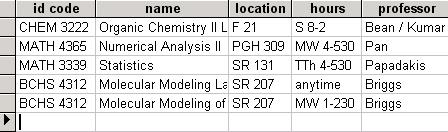
here’s how one of the views might work - eg say you’ve selected items where semester=’spring 2005′, and get this list in the table view:
then click on the schedule view button to get something like this (pulling information from the hours field):
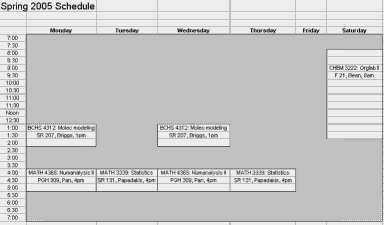
(an example pulled from an excel file, where i annoyingly had to store this information twice - once in a table for a degree plan and again for this schedule view - computers should be doing all that work for you!).
for a great example of an interface like this (at least for the table view), see VIP Simple Todo List ($), though neomem will be storing much more than just things to do… thanks to misha for pointing this program out.
as for the hierarchical navigation (the old tree view on the left), i’m not sure if that will be necessary. personally i’ve found it to be quite a hassle, having to navigate to the proper place to add new records or find existing ones. i think it would be better to just have a type navigator on the left (eg pick a type from a dropdown and pick from a list of items). but it would still be easy to incorporate a tree view if necessary - just add a field to the table to store the parentid and use that to build a tree structure.
not sure how editing individual items will work yet, maybe on double clicking an item it would bring up the item in a dialog with the different views on the data (properties view, text view, etc). might make more sense than trying to cram the navigation and details view onto the same screen, as neomem does now.
and/or maybe one of the available views could be a data navigator view, which would basically be the old neomem interface, with a tree view (or simpler, type navigator) on the left allowing you to select an item, then the detailed information on the right
the backend
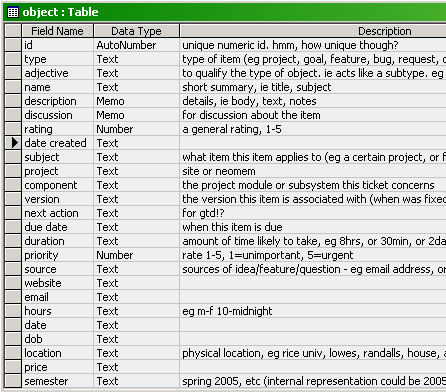
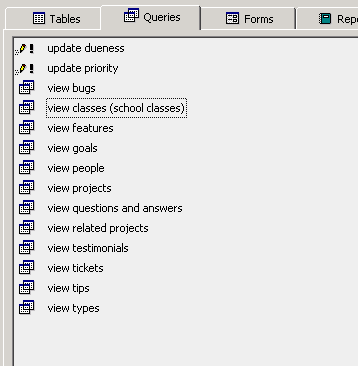
and a bit on the backend - the access database i’m playing around with has all the data stored in one table, with a whole lot of fields. i made a series of queries that will filter out the records based on type, and will display just the fields relevant to that type, so in effect you get a bunch of different tables. i’ll move it to mysql in a bit. not sure yet but might wind up using that as the primary backend for neomem.
eg, here’s the table definition:
and here are some queries on it:
i would love to use the filesystem for the backend but i’m not sure yet how well it would work - it’s certainly not been optimized for access the way databases have, which is a real shame. but maybe it would be doable, with some sort of cache layer acting between them in order to speed access. the benefits of storing all the data as text files would be enormous - transparency, simplicity, easy access via desktop searches, atomicity (eg send an object to someone by just sending the file by email) etc., so much so that it might be worthwhile to work around the limitations of the file system.
also, it would be possible to incorporate in this a move towards a cross-platform solution to the annoying lack of metadata on filesystems. eg tagging a .jpg file with information about it. more on that later…
Tags: No Tags
8 comments
Comments feed for this article
October 18th, 2005 at 11:49 am
Kevin
Interesting ideas! On the subject of the treeview, something I’ve been wanting for a long time is a program that would allow the same data to be displayed in many different ways (eg, tree, block diagram, graph, table, mindmap, etc). After all, just having a bunch of data is grand, but it’s how you structure it that gives it meaning! I would love to be able to use a mindmap to lay stuff out, switch over to table view to see trends, then move back to treeview for actual use. Just an idea,
Kevin
October 18th, 2005 at 2:06 pm
bburns
yes, me too. i’ve never tried mindmaps, but there’s a great open source tool for displaying graphical information like that, graphviz, which would be nice to incorporate. would be an interesting alternative way to navigate or edit the database.
another nice view would be a card view, like in outlook.
and having a graph view would be great as well.
all of these views (including the table and text views) would be developed as plugins, for maximum modularity (not to mention getting other people to help out with some of the coding!)
and another one of the views would be the console view, about which more later…
October 18th, 2005 at 2:19 pm
Kevin
Never seen Graphviz before… that would be great if you could incorporate all that into one program. Even better with import/export to match. Wow, exciting.
Kevin
October 18th, 2005 at 2:51 pm
bburns
thanks, i’m pretty excited about it too
i have so much data to deal with, and tired of having it fragmented across all these different programs and files…
October 24th, 2005 at 7:16 am
ivan
May be just for information - two tools for visualisation of information:
1) FreeMind - mindmaps (non-cyclic graphs);
2) IHMC Concept Map Tools - concept maps (cyclic graphs)
October 24th, 2005 at 8:32 am
bburns
those look great, thanks.
and all these suggestions that people send in are going into the database as tools or related projects. to be published soon (pdf for now, maybe Ruby on Rails for an interactive version).
December 5th, 2005 at 5:41 pm
David Burch
Take a look at TinderBox…
December 5th, 2005 at 6:00 pm
bburns
Looks interesting, thanks -
Brian