
You are currently browsing the monthly archive for October, 2005.
here’s a rough roadmap for what’s ahead - not sure how well the schedule will hold. and a lot of this is sort of notes to myself, since i don’t have a good project management database/tool yet.
this week into next
- finish adding feature requests and bugs from email, blog and forum to the database (4 hrs)
- go through entire feature list, assign cost and benefit and prioritize them (rank 1-5) and assign to future versions (10 hrs)
- clean up the project database - make items more readable, merge duplicates, etc (8 hrs)
- move project database from access to mysql or sqlite (10 hrs)
- publish entire project database via ruby on rails (20 hrs?)
- make it interactive, so people can submit feature requests, bugs, annoyances, questions, answers, comments, related projects, tools, documentation, websites, themselves (including beta tester status, mail notification preferences etc) and vote on features. not sure how involved this will be yet, though could get a really bare interface up pretty quickly. (20+ hrs?)
- move the forum entries into the project database and close the forum (rather have it all tied into the project database) (6 hrs)
note how most of this is just project management stuff - i haven’t seen any (open source) tools that will do all the things i want to do, and i figure doing it myself will help drive development of some features that i want neomem to have.
next week
- do a couple of high priority features and bug fixes for a ‘quick’ version 1.2 release (20-30+ hrs)
november and december
- continue working out the new architecture on paper - i’ve learned that it’s best to hold off even on prototyping, because it’s so much fun to keep adding new features that it becomes the actual program, before you’re really ready to start coding - a really bad project risk!
- continue working on the project management database and website
- convert other notes on planned features to database entries (a long, ongoing process - lots of notes on paper, in my neomem file, and on index cards)
- move code repository from cvs to subversion (will be better for refactoring things, eg renaming files etc)
- host the code repository online, so others can start contributing (even bug fixes and small features would be a great help)
- make a table of contents for the code - (i don’t want to just throw the code at people and expect them to figure out where things are, like so many cvs repositories seem to do)
ultimately i’d like to lower the barrier to contributing to the code as much as possible, eg make it more like wikipedia. there are so many projects that i would love to contribute a little feature to here and there but it’s such a hassle to become acquainted with the code and the editors etc that i’ve never done it. going towards ruby or python will help with that - much easier to read than c++, and also plugins will just be text files.
imagine if anyone could just drill down to the code from the feature list and make a change to the code, without even registering (though as on wikipedia, it’s nice to do so so to keep track of who did what). the server would do the test and build and let the person download it and play with it. then when one of the editors had the chance to review the code they could approve it for general use. that’s my dream for how the website would work, anyway. i think it would be more doable with ruby or python though, since no compilation step on the server would be necessary.
probably by the end of the year i’ll be ready to start developing the program. most likely it will be from scratch, in ruby, with wxwindows for the gui. it will be version 2.0. i’m not sure what will happen with the old code yet - it’s visual c++/mfc, and it’s a bit of a mess. not sure if it would be worthwhile to try and migrate it slowly towards ruby, or just start from scratch. if nothing else, the views would be translatable to view plugins in the new architecture, especially if there’s a c++ to ruby translator to help with the syntactical stuff. i think i’d like to start from scratch with the backend though - there will likely be larger changes to the data structures there.
but all existing data will be migrated smoothly to the new version, one way or another - if nothing else by exporting to xml and importing into the new version.
Tags: No Tags
well, i’ve finished entering the suggestions from the forum into the project database, and have nearly finished those from email. please note this report is very rough, there might be duplicate entries, and the assigned versions will likely be changing. also, there are further details for each item not displayed in this report, including the detailed description. i wouldn’t say the list is exactly readable yet, but i promised that i would post updates as i went along: NeoMem Feature List by Version (63kb pdf). this will eventually become an interactive list.
(note: this also does not include many ideas that are still stuck in unformatted text, on paper, and on index cards. but it’s all getting into the database, eventually. i’m trying to balance getting this stuff entered with working on the architecture of the program.)
the amount of work required to enter this feature database has led to some more feature ideas:
- refactoring text into an object - ie if you have bunch of text, easily chop it up into an object, with properties, description, etc.
- a code view on the underlying code of an object (which would be plain text with wiki/markdown/email type syntax). for refactoring, it would be simplest to just mangle the plain text and let the program parse it out into properties etc.
- importing email (thunderbird stores your email in plain text files) - would be useful to be able to refer to the original email at times, and/or just refactor it into an object.
- importing phpbb forum entries (stored in a mysql database) not sure i’ll be sticking with this program though.
the refactoring capabilities would come in handy in converting a webpage into an object, which i’ve been doing a lot of lately in researching related projects and tools. for instance, you could copy and paste a web page into the editor, then chop it down to something like the following, which neomem would parse out into fields and store in the database:
name: Commons Virtual File System
aka: Commons VFS
url: http://jakarta.apache.org/commons/vfs/
desc: Commons VFS provides a single API for accessing various
different file systems. It presents a uniform view of the files from
various different sources, such as the files on local disk, on an
HTTP server, or inside a Zip archive.
Some of the features of Commons VFS are:
    * A single consistent API for accessing files of different types.
    * Support for numerous file system types.
    * Caching of file information.
    * Event delivery.
project: neomem
rating: 4
added: 2005-10-25
might need to keep this text for reference as well, especially if there were bits it couldn’t parse or understand - i’d like neomem to be a sort of fuzzy database, extracting as much information as possible from possibly ambiguous information, asking for clarification where needed, and keeping the original text around for reference.
[and of course, it would be simpler if websites would provide information like this. ie provide a human view of something (html) and a machine view (xml or rdf or some variant like this wiki/email/markup code).
update: there is such a thing! Resource of a Resource - this looks really cool - spread the word. much cleaner than embedding it in html with meta tags.]
Tags: No Tags
i’ve been playing around with the feature database (and yes, still adding old feature requests), and gradually adding more varied types of information to it. in the process i think i’ve stumbled onto how i’d like the new gui interface to work.
basically, neomem would have access to a flat table of information - each record is an item which can have any number of fields, and each item is of a certain type, eg person, project, goal, feature, tool, bug, book, etc.
the interface
the main gui view will show this list. at the top of the screen will be various filtering, sorting, and grouping options, for instance a dropdown to select the type of items to view (eg just show all people, or all projects, etc).
there will also be a series of view selector buttons. the default will be the table view. but there could also be a text view, a schedule view, a calendar view, a thumbnail view, a map view, etc. the view will render the selected records and allow editing, etc.
the text view would render all the selected items, one after the other. this is something i’ve been wanting neomem to do for a long time - act as a sort of hybrid wordprocessor/database, where you could add a new item just by entering some text in the middle of what you’re writing. the program would then parse out the text and add it as a new record to the database, allowing it to be included in table views, etc. the text view should also incorporate folding, ie click to fold an item up into a single line header. and also, if you wanted to convert some text into a new item, just select the text, right click and say ‘create new item’, and it would be incorporated in place as a new record.
here’s how one of the views might work - eg say you’ve selected items where semester=’spring 2005′, and get this list in the table view:
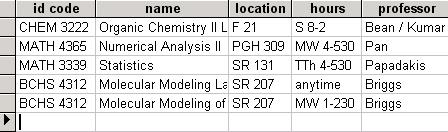
then click on the schedule view button to get something like this (pulling information from the hours field):
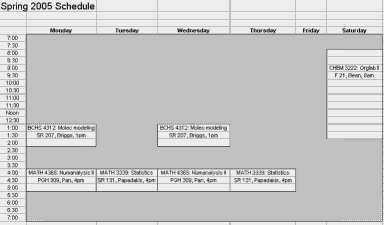
(an example pulled from an excel file, where i annoyingly had to store this information twice - once in a table for a degree plan and again for this schedule view - computers should be doing all that work for you!).
for a great example of an interface like this (at least for the table view), see VIP Simple Todo List ($), though neomem will be storing much more than just things to do… thanks to misha for pointing this program out.
as for the hierarchical navigation (the old tree view on the left), i’m not sure if that will be necessary. personally i’ve found it to be quite a hassle, having to navigate to the proper place to add new records or find existing ones. i think it would be better to just have a type navigator on the left (eg pick a type from a dropdown and pick from a list of items). but it would still be easy to incorporate a tree view if necessary - just add a field to the table to store the parentid and use that to build a tree structure.
not sure how editing individual items will work yet, maybe on double clicking an item it would bring up the item in a dialog with the different views on the data (properties view, text view, etc). might make more sense than trying to cram the navigation and details view onto the same screen, as neomem does now.
and/or maybe one of the available views could be a data navigator view, which would basically be the old neomem interface, with a tree view (or simpler, type navigator) on the left allowing you to select an item, then the detailed information on the right
the backend
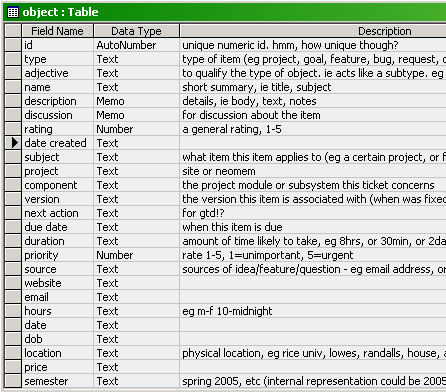
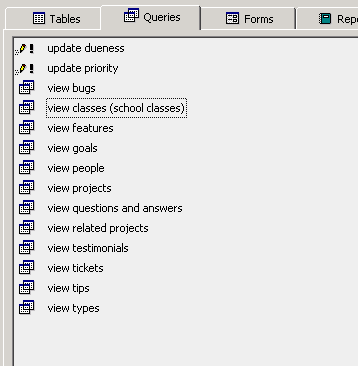
and a bit on the backend - the access database i’m playing around with has all the data stored in one table, with a whole lot of fields. i made a series of queries that will filter out the records based on type, and will display just the fields relevant to that type, so in effect you get a bunch of different tables. i’ll move it to mysql in a bit. not sure yet but might wind up using that as the primary backend for neomem.
eg, here’s the table definition:
and here are some queries on it:
i would love to use the filesystem for the backend but i’m not sure yet how well it would work - it’s certainly not been optimized for access the way databases have, which is a real shame. but maybe it would be doable, with some sort of cache layer acting between them in order to speed access. the benefits of storing all the data as text files would be enormous - transparency, simplicity, easy access via desktop searches, atomicity (eg send an object to someone by just sending the file by email) etc., so much so that it might be worthwhile to work around the limitations of the file system.
also, it would be possible to incorporate in this a move towards a cross-platform solution to the annoying lack of metadata on filesystems. eg tagging a .jpg file with information about it. more on that later…
Tags: No Tags
just a note to let people know what’s going on - i’ve been messing around a lot with the (partially complete) database of features. i’d like to eventually use it to manage this project, in terms of setting goals and associated features, prioritizing what to work on, etc. trac is too simple for what i’d like to do, though maybe the interactivity would make it worthwhile to use. i’m still researching different sites that provide trac hosting.
i got rather involved in data modeling for the project management, which distracted me from just getting all that data entered. sometimes it’s hard to stop though - so many ideas to get down.
and i decided to stay focused on neomem, and treat abby as a bit of a prototype for a future console view to be added to neomem. ideally independent enough that you could just use the console as a separate app if that’s all you wanted. the gui will also need some help though, in terms of making data entry faster and easier. too often neomem just becomes a flat text file with huge amounts of text that needs to get moved elsewhere.
Tags: No Tags
I’ve been going through the various lists of things to do, adding them to an Access database (Excel had a rather miserly limit on the amount of text you can put in a cell).
Why Access instead of NeoMem itself? Partially the lack of good import/export options. But also frustration at the UI and its brittleness. One annoyance - I have objects for both Abby and NeoMem projects, but linking to them is not straightforward, because NeoMem expects links to all be in one folder (these happen not to be). Also a lack of good filtering and sorting mechanisms for folder contents. There are other problems, all of which will be going into the list of needed improvements.
Anyway, this has been quite a project in itself, as there are so many ideas for future features, mostly in free-form text (lots and lots and lots there), but also on index cards, on regular paper, some via email, and some from the forum. It had also been somewhat low on my radar, since I’d been preferring to work on Abby when I had time for programming.
But this list is now at the top of the list of things to do. I’ll be posting the list as I go along.
And if anyone has any suggestions for how to manage such a list, I’d be happy to hear them. Making it interactive is essential. I like the look of Trac, but the installation and upgrading looks like a big time-sucker. Sourceforge seems a bit clunkier, but it might work. But since I’ll be putting Abby in Trac, I’d prefer to put NeoMem there as well just so people (including myself) don’t have to learn two different systems, though the only free hosting site I know of (python-hosting) requires the project to be in Python.
Here’s the list as it stands now, as pdf or Access mdb.
[Access had problems exporting it as HTML so I printed it through PrimoPDF, a useful thing to have installed (and free)]
This list is not complete yet. I did attempt to give some order to when things might be done by assigning them to future versions, so with a little grouping the report could produce a nice roadmap.
Tags: No Tags