
You are currently browsing the category archive for the 'NeoMem' category.
well those clever spammers got into the forum somehow. i must admit i haven’t even looked at in a long time - keeping up an open source project is a lot of work if it gets even somewhat popular - there’s a lot of feedback to keep up with. which is why i’ve never advertised or promoted neomem anywhere, except way back when it was shareware, though even that was pretty minimal. so sorry if i’ve neglected the forum. i’m trying to get back into dealing with everything now though. i’d like to overhaul this site also, and move it all into wordpress, especially if they have a good forum plugin.
that’s also why i’ve been avoiding moving the source code to sourceforge - i sort of dread getting a barrage of emails about how to do x in the code, why is x done this way? how should x be done? etc. but if this thing is ever going to have a decent life i’d need to do that, and be prepared to deal with a lot of correspondence.
so, i don’t know. maybe it would be easier to start the open source project with the new version, which would be plugin based and more modular, therefore less obscure for people to contribute to the code. i’m also thinking about using the eclipse rich client, which is just SO nice. that would mean using java (or maybe groovy?), but that would be nice because it could also use db4o for the backend (a real oo database).
Tags: No Tags
i’m working on fixing an annoying bug - the richedit control (used in the Text View and in searching the entire file) sometimes bombs when rtf text is loaded into it, eg when you do a search, or clicking on an item. at least it does on some people’s systems - i haven’t been able to replicate it, even when someone sent me a file that was bombing! it might be some difference in richedit dll versions (people might have different versions on their systems). i should have a prerelease version of 1.2c fairly soon that will either fix the problem or at least provide some more information on what’s going on. it will also have some more export formats - i’ll try and squeeze xml export into it before the final release.
Tags: No Tags
well, neomem got put on the back burner for a while, but i’m trying to get back to it. it’s sort of tricky in that it can tend to be extremely consuming. but maybe if i limit the time spent on it i’ll actually get more done. ie avoid burnout!
most likely features to be worked on next: xml export, dynamic/search folders, better filtering options, and import csv files. along with some code refactoring.
i’ll also be working on the next version - mostly just the data backend for now. i think i’ve figured out how i’d like it to handle single/multiple values, which had been a bit of a roadblock for a while. well, we’ll see if it works, after a bit of prototyping…
p.s. i switched to moderated comments due to a flood of spam. i’ll try installing one of those spam blocker plugins though.
Tags: No Tags
yeah, i think the best thing i could be doing at the moment is work on refactoring the code, organizing it and making it easier to understand for other developers (and myself, too!). sourceforge did get their subversion hosting working this month, so i’ll be able to host the code there, and i’ll probably migrate the forum and feature database over there. i’d much rather have neomemRails working to host it all, but i just don’t know how long that would take…
there are a lot of features to add to neomem, and there’s no way i can do it all myself, so making it easier on other developers would be pretty important…
and i’m slowly getting to old emails and forum posts…
Tags: No Tags
Version 1.2 is now available here
New features include:
- Export entire file or selected object (recursively) to csv (this has limitations, as far as being imported to other programs - Excel has a 32k character per cell limit and Access a 64k character per row limit, which makes this feature less useful than one might hope. But *someday* there will be an export to XML feature…)
- Uses an ini file instead of the registry for storing options
- Added File, Folder, Email, and Website property types, to replace the Hyperlinks type (which is still available, though deprecated)
- Added Strikethrough format
- Insert date/time from Edit menu or F5 key
- Use Alt+, and Alt+. for back/forwards
- Use Alt+Backspace for undo, in addition to Ctrl+Z
- Various bug fixes, including the one of printing extra blank pages
I’ll send out an announcement email tomorrow - there’s an unofficial mailing list that I need to make official somehow, ie with a signup form on the website and everything.
Tags: No Tags
as i’m putting the finishing touches on the next version, i was thinking, this code really needs some refactoring. it was the first c++ and object-oriented program i wrote, and it shows… i still don’t quite know the best way to do things in c++ - eg things that are so simple in ruby are extremely complex (and brittle) in c++. which is why i don’t like it. but maybe if i spent some time cleaning up the code, modularizing things, and learning the right way to do things in c++, it would be a good investment, because if i’m going to make this a real open source project, it really should have cleaner structure. eg adding a garbage cleanup library would be nice, though the ones i’ve seen don’t work with mfc…
also, it would be an opportunity to either get it ready for, or transition to, wxWidgets (or Qt?) (away from mfc), and also away from visual c++ to the eclipse cdt, which i’d really love to be using. and this would also make it cross-platform (theoretically - not sure how good wxWidgets is at that). and maybe doing some redesign as i go, using test-driven development, a concept which i really like, and wish i had known about when i started neomem back in 1999.
anyway, i actually enjoy doing refactoring, and making things more organized. the only thing is, it doesn’t get me closer to having the type or program that i actually want! neomem has lots of limitations, though maybe i could be throwing new features in as i went…
the biggest limitation to me, at this point, is not being able to just instantly create a new object, not caring about where it goes in a hierarchy, or if the class and property structures are set up yet. that’s what is always slowing me down, and why i still have two boxes full of index cards… so maybe just use ctrl+n for a new object, bring up a dialog with a grid at the top for properties, and a big scratch space at the bottom, and if you just want to throw a bunch of text in there for now, that’s fine. you could always go back and refactor the object later and partition the text out to properties.
the rails project kind of ground to a halt - there was just so much work to do on the basic infrastructure (mostly interacting with the database, adding properties/fields, and the way rails maps objects to fields, plus synchronization issues, and the lack of a good frontend for the database) that it was kind of discouraging - i need and want something now! maybe rails is the way to go, maybe nitro/og would be better though, i’m not sure at this point. so i don’t know what will happen with the new site design… i know what i want, but i don’t know how to get there yet!
Tags: No Tags
well, it looks like everything is working. although i wound up paring down the export features until it’s pretty bare bones, just because getting the simplest things to work is such a hassle in c++, and takes 10x as long as you’d expect it to. i really don’t want to work on this c++ version any more - i’d rather view it as a prototype for a ruby version.
anyway, all it needs at this point is one more bug fix (the printing extra blank pages one), and adding some things to the help file, and then building the setup program. so it should be done tomorrow. i’ll hold off on the site switchover till a few days after that. and then i’ll probably just put the c++ code on sourceforge - they’re adding subversion service soon -
“The SourceForge.net Service Operations Group has completed the implementation of the Subversion service offering on SourceForge.net. The Subversion service has been made available to a select group of beta candidates for a beta testing phase that began on 2006-01-12. Pending successful completion of the beta phase, the full service offering will be made live in February 2006.”
Tags: No Tags
the next version is nearly done - the main new features are file and folder property links, export data to csv and tab delimited, and using an ini file instead of the registry. plus a few other minor features and bug fixes. it might get out tonight, or this weekend. it’ll be version 1.2a, though it doesn’t include all the things slated for version 1.2 in the old pdf reports.
if i were still using microsoft access i could easily provide a new version of those reports, but alas, i switched the data to mysql, and for whatever reason access does NOT work like it’s supposed to, accessing an odbc data source. it just bombs, badly. it’s apparently just some bug they’re content to leave in there. so the days of easily editing data and generating reports is over, until i either build decent tools with the ruby/rails version or find some good free ones or (ugh, gasp) buy some…
i also need to mess with dns servers and get switched over to the new web server, so the site might go down for a bit (24-48 hrs).
Tags: No Tags
well, the carpet finally arrived, after 4 or 5 schedule changes and miscommunications (not a good recommendation for home depot, unfortunately), and today is when i get all my stuff moved in. and then i’ll be surrounded by boxes until i get it all squared away. i’ll try to at least keep the kitchen clear so i can do some work there. i was hoping to get 1.1e released before this but the usual unexpected complications keep arising. like this one, checking some code in to the repository…
C:\work\neomemLite>svn ci -m “various small features, eg insert date/time”
Sending BDataDate.cpp
Sending BDataHyperlink.h
Sending DialogExport.cpp
Sending DialogExport.h
Sending FrameChild.cpp
Sending NeoDoc.cpp
Sending NeoDoc.h
Sending NeoMem.rc
Sending Resource.h
Sending ViewRtf.cpp
Sending ViewRtf.h
Sending build.rb
Sending hlp\NeoMem.hm
Sending resource.h
Sending version.rc
Sending version.rct
Transmitting file data …………….
svn: Commit failed (details follow):
svn: Checksum mismatch for ‘C:\work\neomemLite.svn\text-base\Resource.h.svn-base’;
expected ‘b6b63cf47af336c772dac8804542bdd6′,
actual: ‘8ec660fc13f4764fc3b80485e23b6cb9′
i have no idea what this means… a corrupted repository? something less ominous, hopefully?
anyway, i haven’t replied to emails or the forum very much lately because i just haven’t had the energy for it - dealing with this move and working on neomem has taken up most of that. and for whatever reason the feedback over the last couple of months has kind of skyrocketed. i appreciate all the comments and suggestions, but i should be better able to respond to them in a week or so, once things start settling down…
update: i wound up just deleting that file from the repository, and readding a backed up copy of it. there’s apparently some way of going in and correcting the checksum error, but i didn’t have the energy to deal with that. i’ve heard that the berkeley db backend on subversion is kind of flaky, and maybe this is an example of it (?). and i’m not even using a server or anything - it’s just me on my laptop.
Tags: No Tags
It’s the move that never ends - I’d planned to stay at my cousin’s for a few months, but I’m finding it really hard to get work done here, so I found an apartment, and will be moving in there this week. In the meantime, the code for export is moving along, slowly…
Tags: No Tags
There should be a new release towards the end of the month - I’m working on tracking down some bugs, adding export (and possibly import), and packing my apartment (moving from Houston to Austin at the end of the month).
I can’t wait until books are all digital - I have so many, and they take up so much space…
All it will take is a more readable display (like the electronic ink displays that look more like paper), that’s thin and light. And some nice 3d animation of turning pages…
Tags: No Tags
Happy New Year 
Here’s a shot of the new website, under development. No snazzy graphics yet. And probably too many menu options on the left at the moment (less is more, as they say). It’s based on what will eventually be a generic project management tool, called neomemProject.
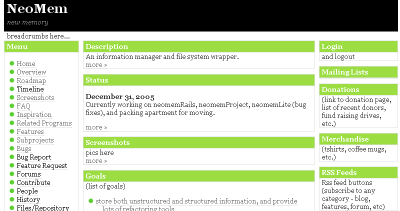
I’m hoping to have this take over this site in February or March. We’ll see how that goes…
NeoMem has been turning into various subprojects over the last several months, and now they have names -
- neomem the current program (C++/MFC). new release(s) coming in January.
- neomemRails - the new version using MySQL and Ruby on Rails. for both desktop and web use - currently under development. old screenshot in this post
- neomemProject - a module built on neomemRails to provide project management. under development.
- neomemData - this is the backend portion of neomemRails, would also be used by neomemRuby and neomemConsole. basically storing everything in one giant table, including relationships. under development.
- neomemRuby - a future desktop version that would replace the current program.
- neomemConsole - a future semi-natural language console-based interface for neomemData. would be both a standalone program, and a view in both neomemRuby and neomemRails.
- neomemPda - sort of a pipe dream - a very simple pda that would work like a stack of index cards. synch whatever data to it that you want to carry around with you. write notes on it with “ink”, then back at your desktop you could translate them to ascii (either manually or with some smart ocr). also a voice recorder function.
I’ll be working on all of this stuff over the coming year. Once I have more of the skeleton of neomemRails working, I’ll start seeking some more developers to help out - that might be a couple of months.
I recently fixed a couple of bugs in neomem, and added one feature (using an .ini file instead of the registry). I’ll be posting these updates as I go, but I don’t have an automated deployment system set up yet, so it’s sort of slow going at the moment.
Also slowly catching up on emails and forum posts and blog comments…
Tags: No Tags
Well a couple more bug reports came in - I’m going to have to bite the bullet and start tracking these things down. And while I’m at it I’ll start on the export and import. Probably just csv/tab delimited for now, but I’ll look into Keypad and Treenote also, see how involved they would be. I’ll aim for a new release in January sometime.
There are a couple of Rails and Subversion enabled webhosts that look promising - A Small Orange and OCS Solutions. So hopefully soon I’ll have this site on Rails, and the source code in Subversion, online.
Also just converted the old CVS repository to Subversion.
Update: I signed up with OCS Solutions, and am switching the site over to it.
Tags: No Tags
Aside from dealing with preparing to move in January and other things, I’ve been playing around with the Ruby on Rails interface. It might wind up being all I need, for a while. And the Ruby classes that wrap the database could be used by other interfaces also, eg a Ruby/wxWidgets standalone program, or a console-based application/view.
Some stumbling blocks though -
I’d assumed it would be pretty easy to synchronize information to a website, ie you have your local MySQL database and one on your website, and just click a button and have them synchronized. Well, maybe if you pay a lot of money for a program to do that. I don’t know if there are any open source programs that will do that. (update: Daffodil Replicator does). MySQL does have replication, but it’s only in one direction. Maybe other databases are more advanced in this area? The concept is pretty simple - surely somewhere out there is code to do this? If not I’ll have to separate out my NeoMem related objects and import them to my webhosts’s database, so I can start hosting this site via Rails.
Which leads to another issue - finding a webhost that will let you host a (possibly unstable) Rails application. My current host (1and1.com) doesn’t seem to support Rails. So I’m looking into others. And it’s not fun. eg this discussion. Hosting Subversion repositories would be essential also.
Another problem is that web hosts don’t like to give you direct access to your database - you usually only have access it through a web interface, like phpMyAdmin. This was (not welcome) news to me. Though programs like Navicat or SQLYog have tunnels to let you access your database through the normal routes. But they cost money.
Of course, all of this would be moot if I had my own webserver. Which is not something I am prepared to deal with at this point (or ever, really), and obviously should not be a requirement for using NeoMem to run your website. The complexity involved with running a Rails application does mean there would be an opportunity for a small business though, to host users’ data, say on the neomem.com domain. But that’s not my focus at this point.
So those things are throwing a few wrenches into my plans to have this site being driven off of a database. It’s still the goal, but I don’t know how long it will take to reach it.
Anyway, that’s where things stand at the moment. I really would like to get the source code for NeoMem 1.1 hosted online this month - I might wind up just throwing it into SourceForge if I can’t find a decent webhost for now. And yes, export and import and bugfixes are high priorities - hopefully I’ll be able to at least start on some of that this month.
Tags: No Tags
The browser interface is coming along faster than expected, thanks to Ruby on Rails - one of the best thought-out pieces of software I’ve ever worked with. Ruby itself is a great language, and the infrastructure around it is much nicer than Python (eg install programs from the command line by “gems install rails” - it’ll search it out on the internet, download it, and install it for you).
Here’s the current Home View - basically a table of contents on your data, with a listing of all the Types stored, some statistics, etc. I’m still working out how the pages will be layed out. There might be a list of views along the top - Home, List, Code, Calendar, Schedule, Project, etc. And some standard filter, sort, and group controls.
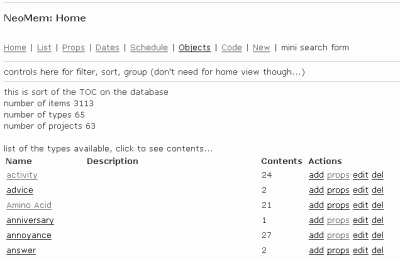
Today I’m working on a Project View, which will summarize a project and its subprojects, and will eventually be used for this site. I’ve given up on using any of the existing bug tracking programs - it doesn’t seem worth the effort of cramming my data into their format, when I can get a simple system up and running on Ruby on Rails, all tied into the rest of the project information (goals, related projects, documentation, people, etc.).
Tags: No Tags
A note on the synchronization issue - I decided to store a GUID in each record, so that if someone adds a new record to your website data, when you synchronize with your local data (which might have the same integer id key), the code can check if it’s actually the same record, and renumber one of them if not (and any related records). That way it can still just use an integer for the key field.
There was some discussion about using GUIDs as primary keys for Rails, but ugh, that would not be pleasant…
Tags: No Tags
One thing I’d really like NeoMem to do is be able to publish your information to a website. And then keep the website in synch with your local datastore, if people edit or add information there. Here’s a simplified diagram of what it’ll look like…
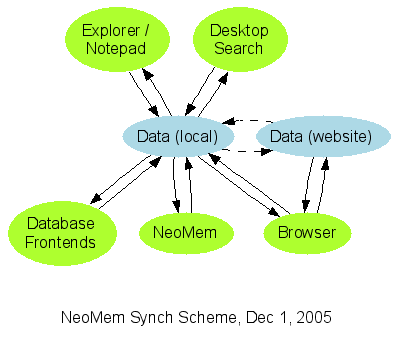
I figure it would be best if I concentrated on the browser interface at the moment, since that will be the most useful, eg for publishing all the project-related information for NeoMem to this site. And it would also function as the user interface on the local data store, until the new Ruby-based interface gets up to speed. The browser interface will probably be based on Ruby on Rails, or possibly Nitro. We’ll see how that goes.
I’ve been avoiding the old C++ code - it’s really not a pleasant thing to deal with, and tracking down old bugs is just not what I want to deal with at the moment (massive time drain). I’d rather just get the “Export All to CSV” working, and then migrate all my data to the new version. Abandon ship! If there’s enough interest in having a really light, C++ based UI on the data then the old program could be fixed up, migrated to wxWidgets and made cross-platform. It might be useful, for a PDA or something.
So the current order of action is:
- Make a Ruby on Rails interface on the data (currently all stored in one giant table, ‘object’)
- Get “Export All” working on the C++ UI
- Get the skeleton of a Ruby/wxWidgets plugin-based user interface working
Sorry to be leaving all those bugs in there, for now… I just don’t seem to have the time or energy to deal with them, and maybe it’s better that I concentrate on the new version anyway… My lease is up at the end of January, and I’ll probably be moving to Austin - I’m planning to digitize a lot of the things in my apartment (file cabinets, notebooks, artwork, etc), with a digital camera mounted on a 2×4, so I won’t have to move so much stuff. The nine bookshelves of books will have to wait a while for their turn, unfortunately…
Tags: No Tags
Here’s is a possible idea for the backend - the objects would be crammed into a relational database for now (unless or until there are good open source oodb’s available). A simple synchronize command would generate a file for each object (stored in YAML code or something similar). Desktop Search plugins would be indexed off of these files, and they could also be edited in Notepad and then resynched with the database.
Putting them in files would also allow storing their history in a repository like Subversion (not sure how easily extractible that history would be though, eg for field values). This would also allow use of standard merging tools for keeping the data in synch with other copies. For instance, if you have a giant database on your home machine, and then upload a chunk of it to a website (say all the objects marked as public) - then they could both be edited at the same time and kept in synch.
Eventually, I’d like to wrap all my existing files with metadata (eg by putting each file in a .zip archive along with a metadata text file (using yaml), and give it some standard extension, like .neoobj or something). These files would then sit in the folder along with all the other yaml object files, and the database would be kept in synch with their metadata also (leaving the actual binary file data on the file system). The net effect is that you would have a virtual file system sitting on top of the existing one, that is platform independent, open source, and provides metadata and history for all your files.
The Windows Explorer plugin would just be something that would expose the folder containing all these objects, and let you save files there (which would then wrap them in a metadata wrapper automatically, etc), or load them, etc. I’m not sure how this would work out yet, but it would be a way of letting legacy apps save files to your data store, instead of the old file system.
Note that if you wanted a portable version to take along with you, all you’d need is the SQLite database and a small frontend (eg the old NeoMem frontend, since it’s in C++ and makes for a small .exe). It could also be adapted for a PDA someday (which I would really like to have, to take the place of all these index cards I’m always carrying around with me). More on that later…
Here’s a rough picture of the architecture:
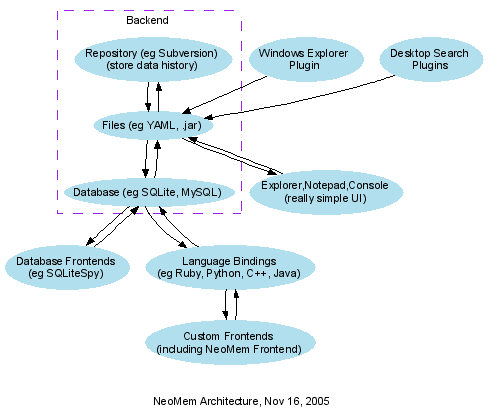
Developed with Graphviz (source for the drawing here).
Tags: No Tags
Here’s the latest feature/bug list: NeoMem Feature List (94kb pdf).
The next release (1.1d) will be just bug fixes (I know, not very exciting, but important). Then I’ll try and get to import/export and a few other requested features for 1.2. But I’m trying to balance my time with working on the new design as well, so some of those things might take a while. I might wind up cutting down the number of features for 1.2 in order to get import/export out. It’ll also help to have the code hosted on this site - that’s coming soon…
Note that version 1.99 is just a catchall for all future features. And 2.0 is for features that will probably best be implemented under the new architecture. And also, this still does not have a bunch of features that are scattered throughout my own notes - those will be added to the database gradually. But it incorporates everything from email, the forum, and the blog, assuming I didn’t miss anything.
And my installation of Access 97 still won’t export to HTML, despite reinstalling it, hence the pdf. I’ve been playing around with Ruby on Rails and MySQL a bit, so eventually this list will be interactive. Either that, or I’ll just put the project into Trac for the time being.
Tags: No Tags
ah well, life happens, and things get in the way - i’ve already gotten behind schedule - just a lot of distractions this last week. i’ve still been working on the database though, which feeds into ideas for the backend. and as usual, lots of other ideas occur along the way. they get jotted down on index cards, and eventually make their way into the database. and there’s a large backlog of blog entries as well.
anyway, what i’m doing is trying to cram all of my information into this (relational) database. currently the weak spots are
- allowing multiple values in a field
- composite field types
- type parsers
- relationships
- version history
i’m sure somebody, somewhere, has solved these problems before. there are some pretty advanced commercial databases out there. sure would be nice to be able to use one of those for the backend…
multiple field values - eg type=”person, performer”, date=”1789 or 1794″, date=”oct 1994 to dec 1998″, filter=”apples and oranges but not lemons”. right now i’m just storing these in the database just like that (ie text). presumably a parser could come along and store the information “properly”, though i’m not sure yet what form that will take. neomem had code to handle multiple item links, but it really needs to be expanded to be able to store arbitrary types of information with arbitrary relationships (ie not just AND).
composite field types - most databases are way too limited in their field types, so much so as to be almost useless - i’m just storing everything as text for now. but basically, all types are composite types, made up of smaller bits of information (until you get to numbers and strings). eg a person is made up of name, address, home phone, etc. an address is made up of street, city, state, zip, etc. a weight is made up of a number and a unit (eg “150 lbs”). so it would be nice to handle all of this generically, to arbitrary depths. right now neomem makes a distinction between object types and field types, but that’s pretty arbitrary (and based in part on the distinction between records and fields, which again is somewhat arbitrary). i think there are some advanced databases that let you define composite types like this, though i haven’t yet looked for any open source projects.
type parsers - ideally, each type would have its own parser, which might call subparsers. eg a NumberUnit parser would call a Number parser to interpret “150″ and a Unit parser to interpret “lbs” (the whole point being to do calculations and convert between units automatically, eventually). and dates, good grief - the number of time that wheel has been reinvented. it really should be a service of the operating system, ie pass it some text and it’ll interpret it for you. well i guess most operating systems do have such parsers but they’re nowhere near as powerful as they could be - hence, they’re basically useless. neomem’s current date parser is a step in that direction though. and all fields should also allow ranges, multiple values, and qualifiers as well, eg “jan 15, 1970 to summer 1975?”.
relationships - there are a lot of different ways of handling this, and i haven’t figured out the best way to do it yet. in some cases all you really need is to store one way information (eg .type=book), since to go the other way you can just do a search (currently how neomem handles relationships). sometimes you’d like two way storage (eg lotr.author=tolkein, tolkein.books=lotr,silmarillion) - and doing it automatically would be nice (ie you add it one place and the db adds the other side). and sometimes you’d like to attach information to the relationship (ie treat the relationship like any other object). ultimately it would be nice to have all relationships stored explicitly as objects - it would make things like displaying the entire network of objects and their relationships easier. and also for attaching “weights” to relationships, eg for building up networks of related objects.
version history - it would be nice if the database tracked the history of any field. this would include the large text fields also, allowing you to track back through the changes. and the information should be easily accessible, for viewing, editing, or feeding into plotting.
i really don’t want to reinvent any wheels though - i’m going to do some research and see what other databases are out there. hopefully there’ll be something useful…
Tags: No Tags
here’s a rough roadmap for what’s ahead - not sure how well the schedule will hold. and a lot of this is sort of notes to myself, since i don’t have a good project management database/tool yet.
this week into next
- finish adding feature requests and bugs from email, blog and forum to the database (4 hrs)
- go through entire feature list, assign cost and benefit and prioritize them (rank 1-5) and assign to future versions (10 hrs)
- clean up the project database - make items more readable, merge duplicates, etc (8 hrs)
- move project database from access to mysql or sqlite (10 hrs)
- publish entire project database via ruby on rails (20 hrs?)
- make it interactive, so people can submit feature requests, bugs, annoyances, questions, answers, comments, related projects, tools, documentation, websites, themselves (including beta tester status, mail notification preferences etc) and vote on features. not sure how involved this will be yet, though could get a really bare interface up pretty quickly. (20+ hrs?)
- move the forum entries into the project database and close the forum (rather have it all tied into the project database) (6 hrs)
note how most of this is just project management stuff - i haven’t seen any (open source) tools that will do all the things i want to do, and i figure doing it myself will help drive development of some features that i want neomem to have.
next week
- do a couple of high priority features and bug fixes for a ‘quick’ version 1.2 release (20-30+ hrs)
november and december
- continue working out the new architecture on paper - i’ve learned that it’s best to hold off even on prototyping, because it’s so much fun to keep adding new features that it becomes the actual program, before you’re really ready to start coding - a really bad project risk!
- continue working on the project management database and website
- convert other notes on planned features to database entries (a long, ongoing process - lots of notes on paper, in my neomem file, and on index cards)
- move code repository from cvs to subversion (will be better for refactoring things, eg renaming files etc)
- host the code repository online, so others can start contributing (even bug fixes and small features would be a great help)
- make a table of contents for the code - (i don’t want to just throw the code at people and expect them to figure out where things are, like so many cvs repositories seem to do)
ultimately i’d like to lower the barrier to contributing to the code as much as possible, eg make it more like wikipedia. there are so many projects that i would love to contribute a little feature to here and there but it’s such a hassle to become acquainted with the code and the editors etc that i’ve never done it. going towards ruby or python will help with that - much easier to read than c++, and also plugins will just be text files.
imagine if anyone could just drill down to the code from the feature list and make a change to the code, without even registering (though as on wikipedia, it’s nice to do so so to keep track of who did what). the server would do the test and build and let the person download it and play with it. then when one of the editors had the chance to review the code they could approve it for general use. that’s my dream for how the website would work, anyway. i think it would be more doable with ruby or python though, since no compilation step on the server would be necessary.
probably by the end of the year i’ll be ready to start developing the program. most likely it will be from scratch, in ruby, with wxwindows for the gui. it will be version 2.0. i’m not sure what will happen with the old code yet - it’s visual c++/mfc, and it’s a bit of a mess. not sure if it would be worthwhile to try and migrate it slowly towards ruby, or just start from scratch. if nothing else, the views would be translatable to view plugins in the new architecture, especially if there’s a c++ to ruby translator to help with the syntactical stuff. i think i’d like to start from scratch with the backend though - there will likely be larger changes to the data structures there.
but all existing data will be migrated smoothly to the new version, one way or another - if nothing else by exporting to xml and importing into the new version.
Tags: No Tags
well, i’ve finished entering the suggestions from the forum into the project database, and have nearly finished those from email. please note this report is very rough, there might be duplicate entries, and the assigned versions will likely be changing. also, there are further details for each item not displayed in this report, including the detailed description. i wouldn’t say the list is exactly readable yet, but i promised that i would post updates as i went along: NeoMem Feature List by Version (63kb pdf). this will eventually become an interactive list.
(note: this also does not include many ideas that are still stuck in unformatted text, on paper, and on index cards. but it’s all getting into the database, eventually. i’m trying to balance getting this stuff entered with working on the architecture of the program.)
the amount of work required to enter this feature database has led to some more feature ideas:
- refactoring text into an object - ie if you have bunch of text, easily chop it up into an object, with properties, description, etc.
- a code view on the underlying code of an object (which would be plain text with wiki/markdown/email type syntax). for refactoring, it would be simplest to just mangle the plain text and let the program parse it out into properties etc.
- importing email (thunderbird stores your email in plain text files) - would be useful to be able to refer to the original email at times, and/or just refactor it into an object.
- importing phpbb forum entries (stored in a mysql database) not sure i’ll be sticking with this program though.
the refactoring capabilities would come in handy in converting a webpage into an object, which i’ve been doing a lot of lately in researching related projects and tools. for instance, you could copy and paste a web page into the editor, then chop it down to something like the following, which neomem would parse out into fields and store in the database:
name: Commons Virtual File System
aka: Commons VFS
url: http://jakarta.apache.org/commons/vfs/
desc: Commons VFS provides a single API for accessing various
different file systems. It presents a uniform view of the files from
various different sources, such as the files on local disk, on an
HTTP server, or inside a Zip archive.
Some of the features of Commons VFS are:
    * A single consistent API for accessing files of different types.
    * Support for numerous file system types.
    * Caching of file information.
    * Event delivery.
project: neomem
rating: 4
added: 2005-10-25
might need to keep this text for reference as well, especially if there were bits it couldn’t parse or understand - i’d like neomem to be a sort of fuzzy database, extracting as much information as possible from possibly ambiguous information, asking for clarification where needed, and keeping the original text around for reference.
[and of course, it would be simpler if websites would provide information like this. ie provide a human view of something (html) and a machine view (xml or rdf or some variant like this wiki/email/markup code).
update: there is such a thing! Resource of a Resource - this looks really cool - spread the word. much cleaner than embedding it in html with meta tags.]
Tags: No Tags
i’ve been playing around with the feature database (and yes, still adding old feature requests), and gradually adding more varied types of information to it. in the process i think i’ve stumbled onto how i’d like the new gui interface to work.
basically, neomem would have access to a flat table of information - each record is an item which can have any number of fields, and each item is of a certain type, eg person, project, goal, feature, tool, bug, book, etc.
the interface
the main gui view will show this list. at the top of the screen will be various filtering, sorting, and grouping options, for instance a dropdown to select the type of items to view (eg just show all people, or all projects, etc).
there will also be a series of view selector buttons. the default will be the table view. but there could also be a text view, a schedule view, a calendar view, a thumbnail view, a map view, etc. the view will render the selected records and allow editing, etc.
the text view would render all the selected items, one after the other. this is something i’ve been wanting neomem to do for a long time - act as a sort of hybrid wordprocessor/database, where you could add a new item just by entering some text in the middle of what you’re writing. the program would then parse out the text and add it as a new record to the database, allowing it to be included in table views, etc. the text view should also incorporate folding, ie click to fold an item up into a single line header. and also, if you wanted to convert some text into a new item, just select the text, right click and say ‘create new item’, and it would be incorporated in place as a new record.
here’s how one of the views might work - eg say you’ve selected items where semester=’spring 2005′, and get this list in the table view:
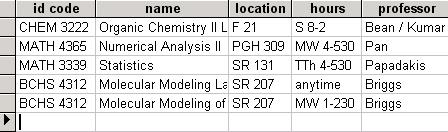
then click on the schedule view button to get something like this (pulling information from the hours field):
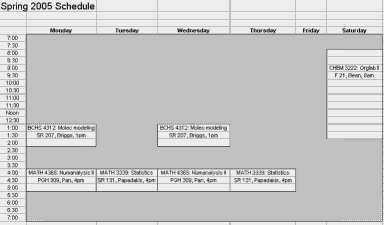
(an example pulled from an excel file, where i annoyingly had to store this information twice - once in a table for a degree plan and again for this schedule view - computers should be doing all that work for you!).
for a great example of an interface like this (at least for the table view), see VIP Simple Todo List ($), though neomem will be storing much more than just things to do… thanks to misha for pointing this program out.
as for the hierarchical navigation (the old tree view on the left), i’m not sure if that will be necessary. personally i’ve found it to be quite a hassle, having to navigate to the proper place to add new records or find existing ones. i think it would be better to just have a type navigator on the left (eg pick a type from a dropdown and pick from a list of items). but it would still be easy to incorporate a tree view if necessary - just add a field to the table to store the parentid and use that to build a tree structure.
not sure how editing individual items will work yet, maybe on double clicking an item it would bring up the item in a dialog with the different views on the data (properties view, text view, etc). might make more sense than trying to cram the navigation and details view onto the same screen, as neomem does now.
and/or maybe one of the available views could be a data navigator view, which would basically be the old neomem interface, with a tree view (or simpler, type navigator) on the left allowing you to select an item, then the detailed information on the right
the backend
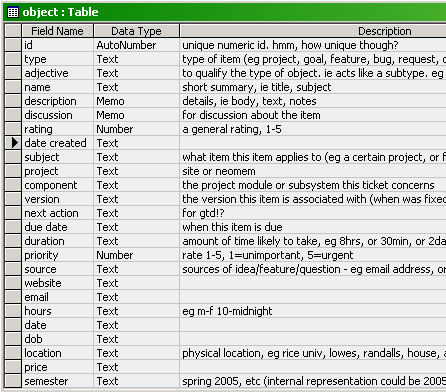
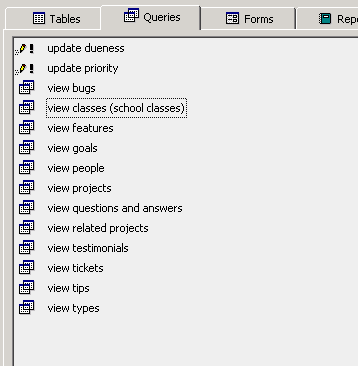
and a bit on the backend - the access database i’m playing around with has all the data stored in one table, with a whole lot of fields. i made a series of queries that will filter out the records based on type, and will display just the fields relevant to that type, so in effect you get a bunch of different tables. i’ll move it to mysql in a bit. not sure yet but might wind up using that as the primary backend for neomem.
eg, here’s the table definition:
and here are some queries on it:
i would love to use the filesystem for the backend but i’m not sure yet how well it would work - it’s certainly not been optimized for access the way databases have, which is a real shame. but maybe it would be doable, with some sort of cache layer acting between them in order to speed access. the benefits of storing all the data as text files would be enormous - transparency, simplicity, easy access via desktop searches, atomicity (eg send an object to someone by just sending the file by email) etc., so much so that it might be worthwhile to work around the limitations of the file system.
also, it would be possible to incorporate in this a move towards a cross-platform solution to the annoying lack of metadata on filesystems. eg tagging a .jpg file with information about it. more on that later…
Tags: No Tags
just a note to let people know what’s going on - i’ve been messing around a lot with the (partially complete) database of features. i’d like to eventually use it to manage this project, in terms of setting goals and associated features, prioritizing what to work on, etc. trac is too simple for what i’d like to do, though maybe the interactivity would make it worthwhile to use. i’m still researching different sites that provide trac hosting.
i got rather involved in data modeling for the project management, which distracted me from just getting all that data entered. sometimes it’s hard to stop though - so many ideas to get down.
and i decided to stay focused on neomem, and treat abby as a bit of a prototype for a future console view to be added to neomem. ideally independent enough that you could just use the console as a separate app if that’s all you wanted. the gui will also need some help though, in terms of making data entry faster and easier. too often neomem just becomes a flat text file with huge amounts of text that needs to get moved elsewhere.
Tags: No Tags
I’ve been going through the various lists of things to do, adding them to an Access database (Excel had a rather miserly limit on the amount of text you can put in a cell).
Why Access instead of NeoMem itself? Partially the lack of good import/export options. But also frustration at the UI and its brittleness. One annoyance - I have objects for both Abby and NeoMem projects, but linking to them is not straightforward, because NeoMem expects links to all be in one folder (these happen not to be). Also a lack of good filtering and sorting mechanisms for folder contents. There are other problems, all of which will be going into the list of needed improvements.
Anyway, this has been quite a project in itself, as there are so many ideas for future features, mostly in free-form text (lots and lots and lots there), but also on index cards, on regular paper, some via email, and some from the forum. It had also been somewhat low on my radar, since I’d been preferring to work on Abby when I had time for programming.
But this list is now at the top of the list of things to do. I’ll be posting the list as I go along.
And if anyone has any suggestions for how to manage such a list, I’d be happy to hear them. Making it interactive is essential. I like the look of Trac, but the installation and upgrading looks like a big time-sucker. Sourceforge seems a bit clunkier, but it might work. But since I’ll be putting Abby in Trac, I’d prefer to put NeoMem there as well just so people (including myself) don’t have to learn two different systems, though the only free hosting site I know of (python-hosting) requires the project to be in Python.
Here’s the list as it stands now, as pdf or Access mdb.
[Access had problems exporting it as HTML so I printed it through PrimoPDF, a useful thing to have installed (and free)]
This list is not complete yet. I did attempt to give some order to when things might be done by assigning them to future versions, so with a little grouping the report could produce a nice roadmap.
Tags: No Tags
this will eventually be a blog about neomem, and its successor, abby, and/or trying to make the file system more tag-friendly. and neuroscience-type things.
here’s the problem: infoglut!
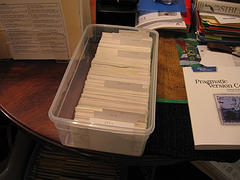
neomem just can’t handle the rate of influx. it’s having a bit of a nervous breakdown. i need something with a console interface, for speed, just throw things into a common store and let the tags organize it all.
so that’s what led to work on abby…
Tags: No Tags